Research registration
Registering scholarly publications
Researchers are responsible for registering their own scholarly publications in NVA. Some publications are imported automatically from Scopus, while others must be registered manually.
What needs to be registered?
It is mandatory to register:
- Scholarly articles
- Scholarly articles in anthologies
- Monographs
How to register?
- Search in NVA to check whether the publication has been imported automatically or registered by someone else.
- Register result (user guide from Sikt)
Which files should be uploaded?
In accordance with the institution’s rights policy, a version of all scholarly articles must be uploaded.
If the article is published behind a paywall (not open access), upload the accepted manuscript (AAM) in line with the rights strategy. The article will be made available under a CC BY license.
You may opt out of open access in NVA without providing a reason. Indicate this in the “Get help from a curator” field. The AAM must still be uploaded. The article will be stored without being displayed.
If the article is published open access, upload the publisher’s PDF (VoR). The article will be displayed under the same license as provided by the publisher.
Registering other research activities
Various types of research outputs and dissemination contributions can be registered in NVA. This includes reports, textbooks, professional articles, lectures, opinion pieces, exhibitions, interviews and more.
Categories in NVA (overview of main and subcategories)
Registering projects in NVA
Project leaders should register their projects in NVA. Projects highlight researcher profiles, research results, and other projects across institutions.
What can be registered as a project?
Projects of various types and scopes can be registered, including main projects and sub-studies.
Ph.D. projects must be registered in NVA. The Ph.D. student is the project leader. Supervisors are not listed as members but should be included in the project description.
What information should be registered?
- Title
- Start and end dates
- Contact information
- People, units, and related projects
- Scientific discipline, keywords, country, and region
- Funding source
How to register?
Start by registering a new project within the registration form for a result, or go to “My page,” select “Project registrations,” and then “New project.”
Register project in NVA (instructions from Sikt)
Guides and user support
Need guidance or have questions? Contact the NVA team at VID:
- By email: nva@vid.no
- In NVA: “Get help from a curator”
Sikt provides a collection of user guides for NVA, including:
- How to create a user account
- My page/researcher profile
- How to register a result
- How to register a project
- How to link ORCID to your profile
- Searching in NVA
Deadlines
The final deadline for nominating new publication channels is November 30 of the publication year, but it is recommended to do this continuously throughout the year.
The deadline for registering your own publications is January 31.
Roles and responsibilities
Researcher
- Is the “submitter” in NVA
- Responsible for registering their own research contributions
- Scholarly publications must be registered
- Full-text files for scholarly articles must be uploaded
- Dissemination contributions are recommended to be registered
Vice Dean for Research and Center Director
- Overall responsibility for ensuring that reserachers register their publications
The Research Committee
- Internal dispute resolution committee for VID.
The local NVA team
- Are “curators” and “editors” in NVA
- Provides user support, guidance, and training
- Checks metadata and makes corrections if needed
- Reviews and approves files
- Verifies records for the annual NVI reporting
The NVA administrator at VID is responsible for NVI reporting to Database for statistikk om høyere utdanning (DBH).
Addressing and institutional affiliation
Addressing of scientific publications related to the employment at VID should be done according to the instructions below.
Main rule for addressing in scientific publications
- An institution should be indicated as the author’s address in a publication if the institution has provided a necessary and substantial contribution or basis for an author's participation in the published work.
- The same author should also mention other institutions as the author's address if these also meet the requirement in point 1 in each case.
- An employment relationship or supervisory responsibility can be considered a basis for crediting an institution if the requirement in point 1 is fulfilled.
For academic staff at VID
When an employee at VID Specialized University is a sole author or co-author of a publication, the author’s address should at a minimum be VID vitenskapelige høgskole or VID Specialized University, provided the publication is a product of work performed in the position at VID. Subunits' names (faculties, centers) should also be included to highlight the academic unit.
The same author should also credit other institutions in the publication if the requirement in point 1 of the main rule is met.
When using two or more institutional author addresses, they should be listed as follows: Faculty of Theology, Diakonia and Leadership Studies, VID Specialized University and XXX institution, or equivalent in other languages.
The address of the author’s primary employment should be listed first.
For candidates in VID's PhD programmes
PhD candidates employed by VID should, like other academic staff, list VID as the author’s address, provided the publication is a product of work performed in the PhD position at VID. This also applies to publications published after the PhD period is completed if the requirements in points 1 and/or 3 of the main rule are met.
Other institutions should also be credited in the publication if the requirement in point 2 of the main rule is met.
Externally employed PhD candidates should list VID as the author’s address in the publication if VID has made a necessary and substantial contribution to, or provided the basis for the published work. Active exercise of supervision responsibility from VID on the cited publication is a sufficient contribution.
The same author should also indicate the primary employer’s address on the publications if the requirement in point 1 of the main rule is met.
For emeriti with workplace at VID
Faculties and centers should, as far as possible, ensure that emeriti include VID Specialized University as the author’s address in accordance with good practice for crediting if the requirement in point 1 of the main rule is met.
For externally paid researchers affiliated with VID
Faculties and centers encourage externally paid researchers to include VID Specialized University as the author’s address in accordance with good practice for crediting collaborators if the requirement in point 1 of the main rule is met.
Examples of addressing
If an author has a primary position at the Faculty of Theology and Social Sciences, VID Specialized University, the addressing should look like this:
- Faculty of Theology and Social Sciences, VID Specialized University
If an author at VID Specialized University has a secondary position at, for example, the University of Stavanger, the addressing should look like this:
- Faculty of Theology and Social Sciences, VID Specialized University and Department of Social Studies, University of Stavanger
If an author at the University of Stavanger has a secondary position at VID Specialized University, the addressing should look like this:
- Department of Social Studies, University of Stavanger and Faculty of Theology and Social Sciences, VID Specialized University
Addressing and reporting to the Database for Statistics on Higher Education
For an institution to be fully or partially credited for a publication when reporting to the Database for Statistics on Higher Education, the institution’s name must appear as the author’s address in the publication itself. The institution’s name refers to VID Specialized University. If only the faculty is listed as the author’s address, this is not sufficient, and the publication thus cannot be credited to VID.
When reporting to the Database for Statistics on Higher Education, it is mandatory to register all author addresses specified in the publication.
ORCID
ORCID (Open Researcher and Contributor ID) is an international standard for uniquely identifying researchers. VID recommends academic staff to register in ORCID.
The benefits of ORCID
- ORCID distinguishes you from other researchers sharing the same name.
- You will be recognized if you have a name with special characters or letters that might lead to different spellings in your publications.
- It is easier for others to find your publications.
- It simplifies registration and application processes, as ORCID is used by an increasing number of publishers, funders, and databases.
- ORCID follows you throughout your career, if you change your name, residence, workplace, or institution in Norway or elsewhere in the world.
How to create an ORCID
It is easy to create an ORCID without any content. By following four simple tips, you will increase the visibility of you as a researcher, your institutional affiliation and your publications.
Start by checking if you are already registered by searching in ORCID. If your name contains special letters or characters, try different spellings.
If you are not registered, create an ORCID here.
Use your VID email address as long as you are employed at the university.
1. Employment at VID
Use the English name of VID, faculty or center, and job title.
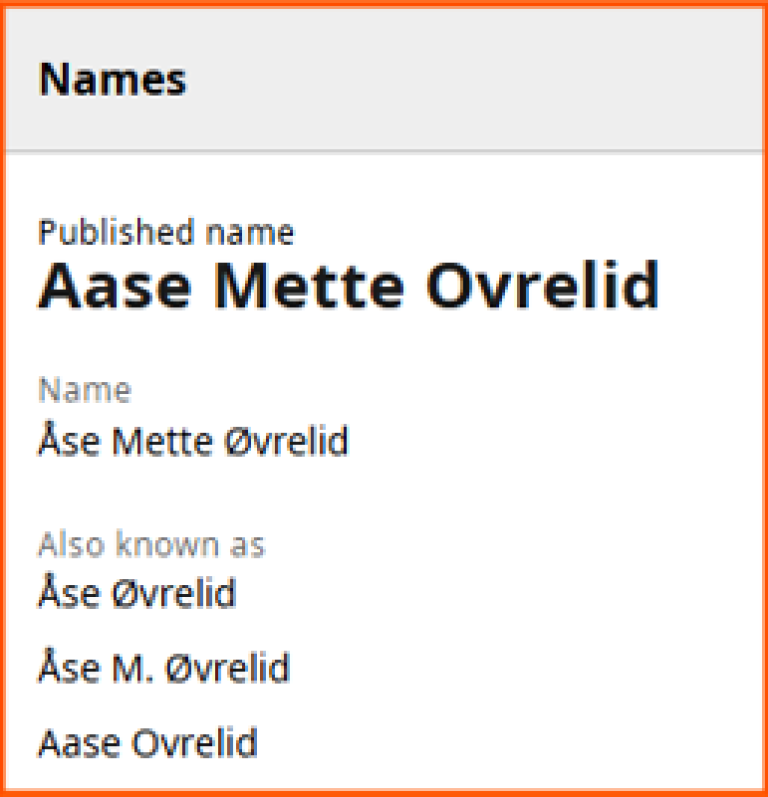
2. Name
When you have created your account, you can add variations of your name.
Click on the edit icon to the right of "Names"

Register your name as you use it your publications, in "Your published name".
Add as many variants of your name as needed after "Also known as".
3. Link to NVA profile
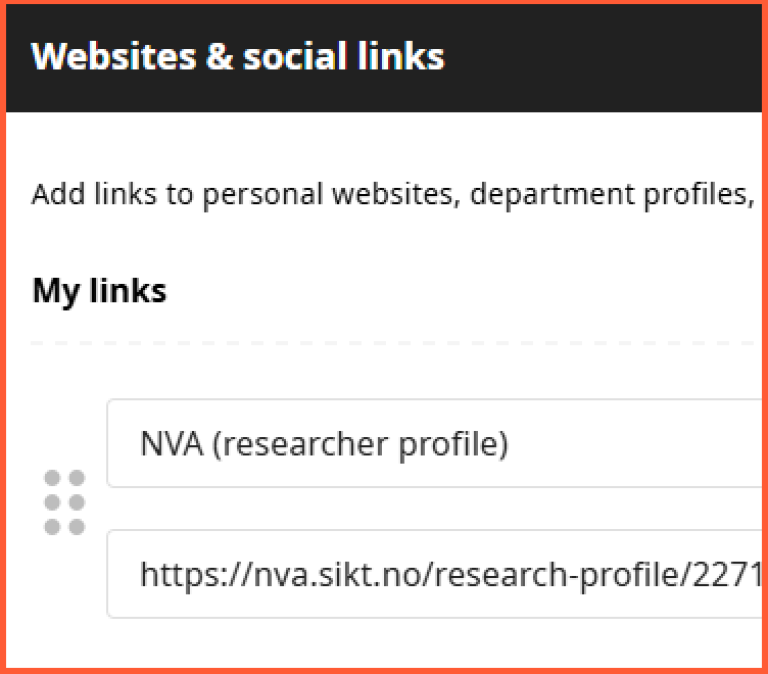
Under "Websites & social links" in the left menu, you can link to your profile in NVA. NVA is well-known in Norway, but in an international context, additional explanation is needed. We recommend naming the link "NVA (researcher profile)".
4. Connect your ORCID to your NVA profile
See How to connect your ORCID and your NVA profile (Sikt).
Find research and literature
NVA
NVA also fuctions as a full text archive for works produced at the university.
Oria and Google Scholar
Search for literature in journals and databases, and more.